


Apple Music
4.653.47K Reviews
App Specs
- Version
- Varies with Device
- Updated On
- License
- Free
- Downloads
- 100,000,000+
- Developer
- Apple
- Categories
- Music & Audio
- Platform
- Android, iOS
Screenshots
 Analysis by AppCompare
I first noticed the household side of Apple Music during an ordinary evening: one person wanted an upbeat playlist while someone else was trying to find a particular album. That kind of shared-device moment is where a music app can either feel easy or turn into a small negotiation. Apple’s app makes browsing a large catalogue straightforward, but the listening experience still depends on whose account is active and what that person wants to hear. I’d treat it as a personal music space that can be used around the house, rather than assuming one set of recommendations will suit everyone.
One device, different listening habits
In a shared living room, quick searches can work well when people take turns choosing tracks. The search tool lets me look for a song, artist, album, or lyrics, which is useful when a family member remembers only a line from a chorus. For less decisive moments, curated playlists give everyone something to try without having to build a queue from scratch. The catch is that a shared listening history can blur personal tastes: repeated children’s songs or workout playlists may influence what the active listener sees later.
My practical approach is to decide whose listening session it is before handing over the phone or starting music on a shared device. That small habit helps keep recommendations meaningful and avoids accidental changes to someone else’s queue or library. If a household mainly wants one person to control music in common areas, this arrangement is simple. If several people expect separate listening histories and independent access at once, they should check which account and subscription arrangement fits their needs before relying on a single shared setup.
Guides and Analysis on Apple Music
Setting expectations before pressing play
Apple Music is free to download, but ongoing access to its full streaming experience involves in-app purchases, with listed items ranging from $5.99 to $199.99. I would look carefully at the plan and renewal details shown in the app before starting a subscription, especially if more than one person in the home may use it. The app is made by Apple, and its presence on Android means it is not limited to people using Apple devices, though the experience may feel most familiar to someone already comfortable with Apple’s services.
For a household, the key question is not simply whether the app has enough music; it is how each person will listen. Before setting it up on a shared phone, tablet, or speaker-connected device, agree on whether the device is for occasional group listening or a particular person’s account. I wouldn’t assume that sharing a device automatically creates separate profiles or keeps recommendations apart. If each listener wants their own saved music and discovery, confirm the account options available to you rather than treating a common device as a multi-user arrangement.
Music choices and age context
The app is rated for Teen audiences, which is useful context for parents, but an age label alone is not a substitute for knowing what a young listener is searching for. Music discovery can lead in unexpected directions, and lyrics, artists, and themes vary widely. I’d listen together at first or talk about how the young person plans to use the app, particularly if they will be exploring recommendations on their own. That is a more realistic trust-building step than assuming every playlist will match a family’s expectations.
For adults who want uninterrupted listening, offline downloads are one of the more useful parts of the experience: save music while connected, then play it when Wi-Fi is unavailable. In a household, that helps on commutes or trips where connectivity is patchy, but it also makes it worth checking downloads before leaving and remembering that saved tracks take up device storage. I find it better to download a few albums or playlists I know I’ll use than to save everything impulsively and wonder where the space went.
Worth Reading Before You Choose

Basketball Stars: Multiplayer Is Fast, but Can It Recover When Matches Go Wrong?

WEBTOON Turns Phone Updates Into a Better Reading Routine

Link to Windows Runs on Shared Habits, Not Social Feeds

How Alibaba.com Dominates the B2B Marketplace

Metro's Quiet Rise: Redefining Mobile Communication

Harnessing Ecosystem Power with Phone Tracker by Number
Discovering a World of Music
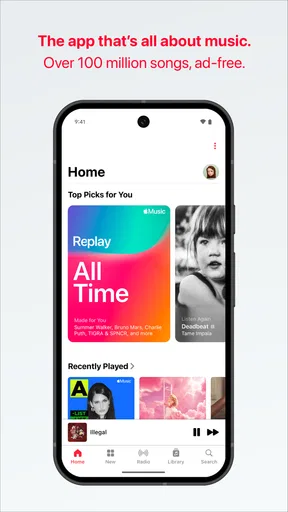
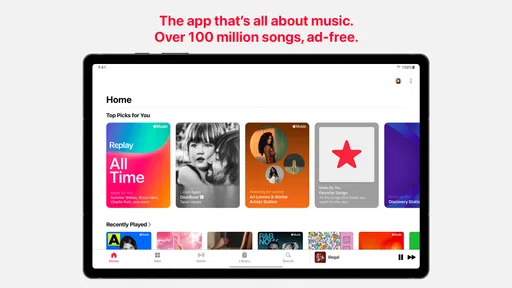
You know that feeling when you find a song that perfectly matches your mood? Well, Apple Music seems to have mastered the art of reading minds. With its vast library, it’s like having your very own DJ that knows exactly what you’re into. From chart-toppers to hidden gems, the selection is pretty impressive.
The app has this cool feature called “For You” that curates playlists based on your listening habits. It’s kind of like having a friend who knows your taste in music better than you do. I found myself jamming to playlists I didn’t even know I needed.
User-Friendly Experience
Navigating through the app is a breeze. The interface is sleek and intuitive, making it easy to find what you’re looking for. Whether you’re in the mood for some chill vibes or ready to rock out, everything is just a tap away. The search function is particularly handy, allowing you to find tracks, albums, artists, or even lyrics in seconds.
One feature I found super handy is the offline listening option. Perfect for those times when you’re off the grid but still need your music fix. Just download your favorite tracks and you’re good to go, even without Wi-Fi.
Live Radio and More
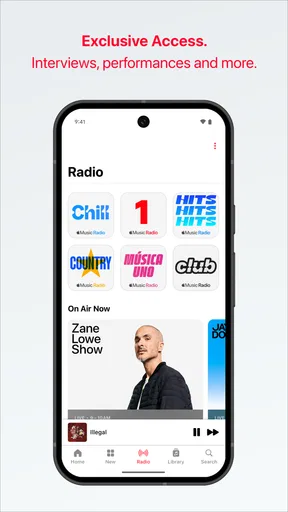
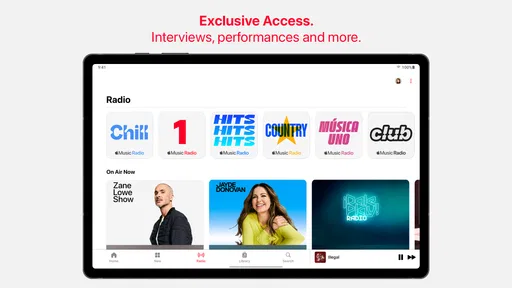
Besides the endless music library, the app offers live radio stations which are pretty awesome. Whether you’re into talk shows, breaking music news, or just want to catch up on the latest hits, there’s something for everyone. I personally enjoyed tuning into Beats 1. It feels like a live concert that you can join anytime.
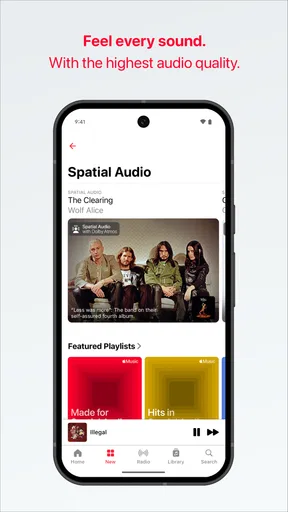
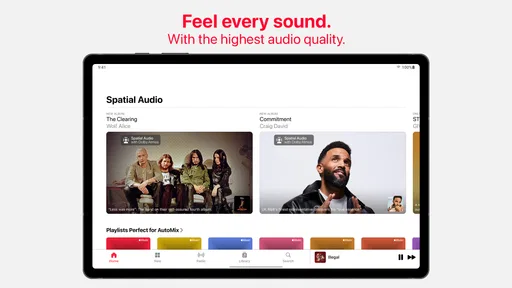
And if you’re an audiophile, you’ll appreciate the high-quality sound. The audio is crisp and clear, making every listen a delight for the ears. Plus, with the lyrics feature, you can sing along without mumbling the words you don’t know. Not that I ever do that…
Moving between listeners and services
When a household shares music, coordination matters as much as the catalogue. I’d make one person the deliberate “picker” for a dinner playlist, then let someone else take over for a drive, rather than having several people search and add tracks at once. It keeps the session from becoming a contest of taps and makes the music feel chosen instead of random. Lyrics search is especially helpful here: a guest can identify a remembered line without needing to know the artist or exact title.
Compared with radio-focused listening, Apple Music gives me more control over what plays next and makes it easier to return to a chosen album or playlist. Compared with a free, ad-supported music option, its appeal is the ad-free listening described for the service, but the trade-off is that continued streaming access is tied to paid in-app options. If you mostly want background radio and don’t mind interruptions, a free alternative may be a better fit. If you regularly choose specific albums, build playlists, or want offline listening, this app makes a stronger case.
I also wouldn’t choose it solely for its sound claims. A good pair of headphones or speakers matters, and the room, connection, and source all affect what you hear. The app’s high-quality audio is welcome, but casual listeners using a small phone speaker may not notice much difference. I’d try the same familiar track on the equipment I actually use before deciding that sound quality alone justifies a subscription.
Small habits that make discovery better
One useful way to make recommendations feel less random is to give the app a clearer picture of what you genuinely enjoy. When a playlist lands well, save or revisit it; when it misses, switch to a known artist or album rather than letting an unwanted mood run on in the background. The “For You” selections are most valuable when they complement deliberate listening, not when I expect them to replace it. I treat them as a starting point for finding something new, then keep the discoveries that earn a second listen.
For a commute or a long stretch away from reliable Wi-Fi, I prepare downloads before leaving instead of assuming every track will be available offline on demand. I also keep the download list focused: a few dependable playlists cover more situations than a scattered pile of albums I may never play. This is a small workflow, but it prevents the common frustration of reaching a dead zone and discovering that the music I meant to save is still only available to stream.
Radio serves a different purpose from playlists. When I don’t want to make choices, a live station gives listening a sense of occasion and can introduce me to music or talk I wouldn’t have searched for. When I need a particular mood or want a precise sequence, I prefer a playlist or album. Having both approaches in one app is convenient, though anyone who wants only hands-off radio may find a dedicated radio service simpler.
Who will get the most from it?
I’d recommend Apple Music to listeners who move between focused album listening and casual discovery, and to people who like having radio alongside on-demand tracks. It can also suit a household where one person manages the music for shared moments and everyone is comfortable taking turns. Apple Music has an average rating of 4.6 from around 693,000 ratings, and it has passed 100 million installs, so it is clearly a widely used option rather than a niche player.
It is less compelling for someone who rarely listens, dislikes subscriptions, or is happy with a free service’s selection and interruptions. It may also frustrate a home where every listener expects a completely separate experience on one shared account. The app’s Teen content rating is worth keeping in mind, but it does not settle whether its content suits a particular child; parents should make that call based on the listener and the household’s expectations.
New users can start by searching for artists they already like, then use “For You” to branch out once the app has some listening context. A reliable first test is to search for a familiar album, play a few tracks, and see whether the interface makes it easy to return to what you want. If lyrics are the reason you’re opening the app, search by a line you remember; if the goal is music for a trip, download a playlist before leaving. These simple checks tell you more about fit than browsing recommendations for a few minutes.
Final Thoughts
All in all, Apple Music is a solid choice for anyone who loves discovering new tunes or just wants an extensive library at their fingertips. It’s like having a personal DJ, a music library, and a live concert all rolled into one app. So if you haven’t given it a shot yet, why not dive in and see what beats await you? You might just find your next favorite song.
For my own household verdict, it works best when people agree on who is choosing and understand that one listener’s habits can shape the experience they see. I’d use it for a shared dinner playlist, my own saved albums, and downloads before a journey, but I’d pause before making a single account the answer for everyone’s independent listening. Apple released the app on November 10, 2015, and its Teen rating, free download, and in-app purchase range are all worth weighing alongside the way your household actually listens. If those boundaries suit you, it is an easy app to recommend; if separate tastes and account experiences are essential, compare the available plans and alternatives first.
Pros
- High-quality audio streaming available.
- Extensive library with millions of songs.
- Seamless integration with Apple devices.
- Personalized playlists and recommendations.
- Offline listening for subscribed users.
Cons
- Limited features on the free version.
- Android app may have occasional bugs.
- Requires Apple ID for full functionality.
- Family plan can be pricey for some.
- Not all songs available for offline use.
FAQs for Apple Music
What platforms is Apple Music available on?
Apple Music is available on a wide range of platforms, including iOS and Android devices, Windows and Mac computers, and Apple devices like the Apple Watch, Apple TV, and HomePod. This flexibility allows users to enjoy their music library and curated playlists across different devices seamlessly.
Does Apple Music offer offline listening?
Yes, Apple Music allows users to download songs, albums, and playlists for offline listening. This feature is particularly useful for users who want to conserve data or listen to music in areas with limited internet connectivity. However, an active subscription is needed to access offline content.
How does Apple Music's family plan work?
Apple Music offers a family plan that allows up to six family members to share a subscription at a reduced cost. Each member gets their own personal account, meaning they can have individual music libraries and recommendations. This plan is a cost-effective option for families or groups sharing the service.
What is the difference between Apple Music and iTunes?
Apple Music is a streaming service that offers access to millions of songs, curated playlists, and radio stations. iTunes, on the other hand, is a media player and library where users can purchase and download music. While iTunes focuses on buying music, Apple Music is all about streaming.
Is there a free trial available for Apple Music?
Yes, Apple Music typically offers a free trial period, allowing users to explore the service and its features before committing to a subscription. The trial usually lasts for a month but can sometimes be extended to three months during special promotions. It's a great way to test the service.


